The current release is version 0.26.1 from November 11, 2026. What's new is in the News. The game is free; you need no account and no Godot.
The easiest way
The Launch Pad
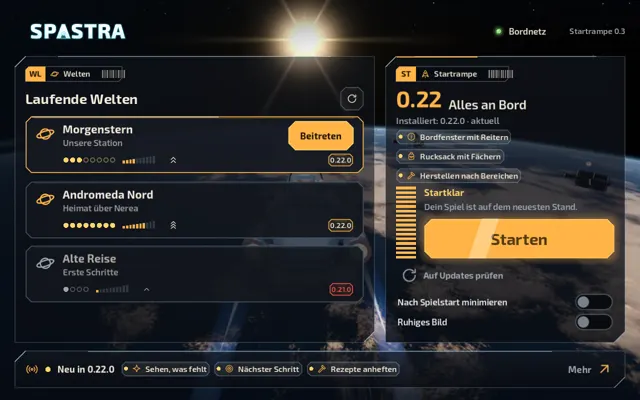
A small launcher in front of the game: it opens in about a second, shows the running worlds with player counts, joins with one click, and installs and updates Spastra itself – with checksum and fallback version, without administrator rights. Unpack, start, done.
New in Launchpad 0.3: Nerea lives in the background, the tank fills up while loading, and a click on “Launch” ignites the game. Still running 0.1 or 0.2? Download the launcher again once. Your installed game and your saves are kept.
Launchpad 0.3 from October 29, 2026. The Windows version has not yet been tested on real hardware – feedback is welcome. Prefer no launcher? The full game is right below.
Verify with sha256sum Spastra-0.26.1-linux-x86_64.zip.
macOS comes later.
What your computer needs
System: Windows 10 or 11 (64-bit) or Linux x86_64
Graphics: a graphics card with Vulkan support; on Windows, Direct3D 12 also works. Older graphics start in the simpler OpenGL mode.
Memory: at least 4 GB
Free space: plan for at least 12 GiB for the ZIP file and unpacking. The unpacked game needs at least 6 GiB. The exact ZIP size is listed above, next to each download.
A world is a single file with the extension .sav. The main menu shows a notice as soon as a newer version is available.
Until version 0.1.0, the game was called “Schrott & Sterne”. Worlds and settings from the old folder Schrott & Sterne are carried over by Spastra automatically on first launch.
Older versions
Version 0.26.0 from November 11, 2026: Windows (5,639.1 MB), Linux (5,603.1 MB)
Version 0.25.0 from November 3, 2026: Windows (5,637.7 MB), Linux (5,601.7 MB)
Version 0.19.1 from October 17, 2026: Windows (446.1 MB), Linux (436.5 MB)
Version 0.19.0 from October 16, 2026: Windows (445.7 MB), Linux (436.0 MB)
Version 0.18.1 from October 15, 2026: Windows (445.6 MB), Linux (435.9 MB)
Version 0.18.0 from October 12, 2026: Windows (445.5 MB), Linux (435.9 MB)
Version 0.17.1 from October 12, 2026: Windows (445.5 MB), Linux (435.9 MB)
Version 0.17.0 from October 10, 2026: Windows (445.5 MB), Linux (435.8 MB)
Version 0.16.0 from October 9, 2026: Windows (442.9 MB), Linux (433.3 MB)
Version 0.15.2 from October 7, 2026: Windows (442.5 MB), Linux (432.9 MB)
Version 0.15.1 from October 7, 2026: Windows (442.5 MB), Linux (432.8 MB)
Version 0.15.0 from October 6, 2026: Windows (442.4 MB), Linux (432.8 MB)
Version 0.14.0 from October 6, 2026: Windows (442.3 MB), Linux (432.7 MB)
Version 0.13.0 from October 3, 2026: Windows (438.7 MB), Linux (429.1 MB)
Version 0.12.1 from October 3, 2026: Windows (437.3 MB), Linux (427.7 MB)
Version 0.12.0 from October 3, 2026: Windows (390.2 MB), Linux (380.6 MB)
Version 0.11.1 from October 2, 2026: Windows (404.3 MB), Linux (394.7 MB)
Version 0.11.0 from October 2, 2026: Windows (401.1 MB), Linux (391.5 MB)
Version 0.10.1 from October 2, 2026: Windows (393.6 MB), Linux (383.9 MB)
Version 0.10.0 from October 2, 2026: Windows (369.6 MB), Linux (359.9 MB)
Worlds from older versions can be continued in newer ones. To play together, everyone needs the same version.